XCIPTV is now the benchmark solution for enjoying an exceptional IPTV experience directly on your smartphone. This revolutionary application transforms your cell phone into a true entertainment center, offering unlimited access to your favorite channels, movies and series in high-definition streaming.
In a world where mobility is essential, watching TV on your smartphone is no longer a luxury, but a necessity. Whether you're on the move, on a business trip or just relaxing on your sofa, XCIPTV accompanies you everywhere with impeccable streaming quality.
This IPTV application stands out for its ease of use, extensive compatibility and advanced features specially designed for the mobile experience. Let's find out why XCIPTV is the ideal choice for transforming your smartphone into a new-generation portable TV.
What is XCIPTV and why choose this IPTV application?
Definition and main features
XCIPTV is a modern IPTV player specially optimized for Android mobile devices. This application lets you play IPTV streams directly on your smartphone, using M3U playlists or direct links to your favorite content.
The application is characterized by its remarkable versatility. It supports a wide range of video formats, from classic SD to 4K Ultra HD, automatically adapting to the quality of your Internet connection. Its robust technical architecture guarantees smooth playback even with variable connections, typical of mobile use.
Key features include an integrated electronic program guide (EPG), a customizable favorites system, recording and replay options, and full parental controls. This wealth of features puts XCIPTV head and shoulders above the competition in the field of mobile IPTV players.
Advantages over other IPTV players
Compared with other solutions on the market, XCIPTV offers several decisive advantages. Its impressive start-up speed means instant access to your content, without the long loading times often encountered with other applications.
Another major strength is the intuitive user interface. Unlike traditional IPTV players, which are often complex, XCIPTV offers simplified navigation, perfectly suited to touch screens. Menus are logically organized, and essential functions are always just a few keystrokes away.
Connection stability is another major advantage. XCIPTV incorporates automatic reconnection algorithms that maintain streaming continuity even in the event of network fluctuations. This feature is particularly valuable for mobile use, where connection quality can vary.
Installing and configuring XCIPTV on an Android smartphone
Downloading and installing the APK
Installing XCIPTV on your Android smartphone requires a few simple but important steps. Start by downloading the APK file from the application's official website. Avoid unofficial sources that may contain modified or unsafe versions.
Before installation, activate the «Unknown sources» option in the security settings of your Android smartphone. This allows you to install applications from sources other than the Google Play Store. Once this option has been activated, launch the installation by opening the downloaded APK file.
The installation process takes just a few minutes. The application automatically integrates into your application menu and creates the necessary shortcuts. After installation, you can deactivate the «Unknown sources» option for security reasons, as XCIPTV works perfectly without this permanent authorization.
M3U playlist configuration
Setting up M3U playlists is the crucial step in accessing your IPTV content. XCIPTV accepts several import methods: direct URL, local file or manual entry. The URL method remains the most practical, as it enables automatic updating of your channel lists.
To add a playlist, access the «Settings» menu, then «Playlists». Select «Add a playlist» and choose your preferred import method. If you use a URL, XCIPTV automatically downloads the list and organizes the channels by category (Sport, Movies, Documentaries, etc.).
Multiple playlist management lets you separate different types of content or IPTV subscription sources. This feature is particularly useful for organizing your channels according to your preferences or those of your family.
Optimum settings for mobile
Optimizing XCIPTV settings for mobile use dramatically improves your streaming experience. Start by adjusting video quality according to your mobile package: prefer HD for WiFi and SD for mobile data to keep your consumption under control.
Buffer parameters deserve particular attention. A buffer of 3 to 5 seconds offers a good compromise between fluidity and start-up time. For unstable connections, increase this value to 10 seconds to avoid frequent interruptions.
The audio configuration must also be adapted to mobile use. Activate volume normalization to avoid significant sound variations between channels. This function is particularly useful when viewing with headphones on public transport.
Optimized user interface and mobile experience
Adaptive design for touch screens
The XCIPTV interface has been specially designed to fully exploit the capabilities of modern touch screens. Navigation elements are sized to allow natural finger interaction, without the need for excessive precision. This design-first approach guarantees comfortable use even on smartphones with smaller screens.
The intuitive gesture system enhances the user experience. A simple side swipe navigates between channels, while a vertical swipe scrolls through categories. These natural interactions reduce the learning curve and make the application accessible to all users, whatever their technical level.
Automatic adaptation to screen orientation is another major advantage. XCIPTV adjusts instantly from portrait to landscape mode, optimizing the display for every configuration. This flexibility allows you to enjoy the full video experience according to your viewing preferences.
Intuitive navigation and ergonomics
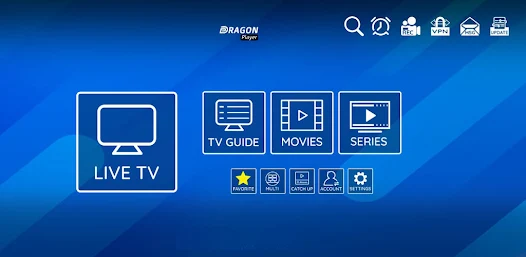
XCIPTV's navigation structure emphasizes simplicity without sacrificing functional richness. The main menu clearly presents the essential sections: Live channels, VOD, Favorites and Settings. This logical organization makes it easy to find the content you're looking for without excessive navigation.
The integrated search system makes it easy to find specific content. Simply type in the name of a channel, movie or series to get instant results. This feature is particularly useful when managing playlists containing hundreds of channels.
Customizable shortcuts further enhance overall ergonomics. You can define quick actions for your most frequently used functions, such as accessing favorites or changing video quality. This customization adapts the application to your specific usage habits.
Interface customization
XCIPTV offers numerous customization options to adapt the interface to your tastes and needs. A choice of themes (dark, light, colorful) allows you to optimize visual comfort according to the environment in which you're using it. The dark theme is particularly appreciated for night viewing sessions.
Channel grid customization improves the organization of your content. You can create personalized categories, rearrange channels in order of preference or hide those you never use. This flexibility transforms XCIPTV into a truly personalized television.
Information display options are also configurable. Choose the metadata to be displayed (title, duration, description) and its positioning on the screen. This granular control allows you to adapt the interface perfectly to your viewing habits.
Streaming quality and performance on mobile
Video formats supported (4K, HD, SD)
XCIPTV excels in supporting a wide range of video formats, from economical SD to 4K Ultra HD. This extensive compatibility guarantees an optimal experience whatever your IPTV subscription or the quality of your Internet connection. The application automatically detects the optimum format and adapts to streaming conditions in real time.
Managing 4K on smartphones deserves special attention. Although not all smartphones can natively display this resolution, XCIPTV optimizes rendering to take advantage of modern high-definition screens. This technical approach guarantees exceptional image quality even on lower formats.
Support for modern codecs (H.264, H.265/HEVC) ensures efficient compression with no loss of quality. This technical optimization reduces bandwidth consumption while maintaining excellent video quality, particularly important for mobile use with limited data packages.
Bandwidth management
Intelligent bandwidth management is one of XCIPTV's technical highlights. The application constantly monitors the quality of your connection and automatically adjusts the streaming resolution to maintain smooth playback. This dynamic adaptation avoids the frustrating interruptions often encountered with other IPTV players.
Adaptive buffering further enhances performance. XCIPTV anticipates variations in throughput and adjusts buffer size accordingly. This built-in artificial intelligence ensures continuous playback even during network traffic peaks or when traveling in areas of variable coverage.
Bandwidth throttling options give you precise control over data consumption. Particularly useful for users with limited mobile packages, this feature prevents unexpected overruns while maintaining acceptable streaming quality.
Connection stability
XCIPTV incorporates automatic reconnection mechanisms that maintain streaming continuity even in the event of network micro-cuts. This technical robustness is crucial for mobile use, where cell changes or transitions to low-coverage areas are frequent.
Multi-source switching adds an extra layer of reliability. If your main source becomes unavailable, XCIPTV automatically switches to an alternative source without interrupting viewing. This redundancy guarantees maximum availability of your favorite content.
Support for modern streaming protocols (HLS, DASH) optimizes compatibility with different IPTV providers. This technical versatility ensures optimal operation whatever the source of your content, eliminating compatibility problems often encountered with less sophisticated players.
Advanced features for the mobile experience
Electronic TV Guide (EPG)
XCIPTV's integrated electronic program guide turns your smartphone into a real smart TV. This feature displays current and upcoming programs on all your channels, enabling you to plan your viewing time optimally. The EPG updates automatically and presents information in a clear, organized way.
Setting reminders is a major benefit of the EPG guide. You can set notifications for your favorite shows, ensuring you never miss an important program. These reminders work even when the application is not active, turning your smartphone into a personal entertainment assistant.
EPG search makes it easy to find specific content. Search by title, genre, actor or director to quickly find the programs that interest you. This feature is particularly useful for managing the complex programming schedules of extended IPTV packages.
Recording and replay
XCIPTV's recording capabilities let you capture your favorite programs for later viewing. This capability turns your smartphone into a real digital video recorder, ideal for managing schedule constraints or enjoying your content without an Internet connection.
The integrated replay system provides access to recent programs on many channels. This feature, also known as «catch-up TV», lets you catch up on missed programs up to several days after their original broadcast. The time navigation interface makes it easy to search through the available archives.
Scheduled recordings can be managed directly from the EPG. Select a future program and schedule it for automatic recording. XCIPTV then takes care of capturing the content at the scheduled times, even if your smartphone is in standby mode.
Parental controls and bookmarks
XCIPTV's parental control system offers complete protection for families. You can define access codes for certain channel categories, limit access according to time of day, or block certain content altogether. This granularity of control ensures safe use for all family members.
Multiple profile management allows each user to personalize their experience. Each profile has its own favorites, viewing history and parental control settings. This separation guarantees an experience adapted to each user, while maintaining the safety of the youngest.
The intelligent favorites system learns from your viewing habits to automatically suggest relevant content. These personalized recommendations enrich your viewing experience by introducing you to new programs that match your tastes.
Compatibility and integration with other devices
Multi-device synchronization
XCIPTV offers advanced synchronization between all your connected devices. Your favorites, viewing history and personalized settings are automatically found on all your devices using the application. This seamless experience means you can start a program on your smartphone and finish it on your tablet or Smart TV without losing your progress.
Integrated cloud backup protects your personalized data from accidental loss. In the event of a smartphone change or reset, all your preferences are automatically restored the first time you connect. This data security guarantees the preservation of your personalized experience.
Inter-device playlist sharing makes family IPTV management easy. Set up your sources once on a main device and share them instantly with all other devices in the home. This centralization simplifies maintenance and guarantees consistent access to content.
Casting to Smart TV
Built-in casting functionality makes it easy to stream your XCIPTV content to your Smart TV or any Chromecast-compatible device. This wireless projection turns your smartphone into a smart remote control, while enjoying the comfort of a big screen for family viewing.
Remote control from a smartphone during casting offers a premium user experience. Change channels, adjust volume or navigate menus directly from your phone without interrupting the broadcast on the TV. This flexibility combines the best of both worlds: smartphone mobility and big-screen comfort.
Streaming quality optimized for casting maintains high resolution even during projection. XCIPTV automatically adapts streaming settings to your TV's capabilities, guaranteeing optimal quality whether you're watching in 1080p or 4K.
XCIPTV rates and subscriptions
The XCIPTV application offers several subscription packages to suit all needs and budgets. The diversity of our offers means you can choose the most appropriate solution for your needs and expectations in terms of advanced features.
| Formula | Monthly price | Features included | Recommended for |
|---|---|---|---|
| Basic | 4,99 € | Standard playback, 1 device | Occasional use |
| Standard | 9,99 € | HD, 3 devices, EPG | Regular use |
| Premium | 14,99 € | 4K, 5 devices, recording | Families |
| Professional | 24,99 € | Unlimited, all functions | Intensive use |
The Premium package offers the best value for money for most users. It includes all the essential features while allowing use on several devices simultaneously. This flexibility is perfect for families who want to enjoy IPTV on different media.
Annual subscriptions benefit from a significant discount, saving up to 20% compared with monthly payments. This cost-effective option is aimed at users who are certain of their choice and wish to optimize their entertainment budget.
FAQ - Frequently asked questions about XCIPTV
Is XCIPTV free? XCIPTV offers a 7-day free trial to test all its features. After this period, a paid subscription is required to continue using the application. Prices start at €4.99 per month for the basic package.
On which devices can I install XCIPTV? XCIPTV is designed primarily for Android smartphones and tablets. The application runs on all Android 5.0 and higher devices. A version for iOS is also available, as well as apps for Smart TV and Android TV boxes.
How do I import my M3U playlists? You can import your M3U playlists in several ways: via a direct URL, by uploading a local file or by manually entering the links. The URL method is recommended, as it enables automatic updating of your channel lists.
Does XCIPTV work without an Internet connection? XCIPTV requires an internet connection for live streaming. However, recorded content can be viewed offline. The download function for offline viewing is available in the Premium and Professional packages.
Can I use XCIPTV on several devices simultaneously? The number of authorized devices depends on your subscription package. Basic allows use on 1 device, Standard on 3 devices, Premium on 5 devices, and Professional unlimited.
How do I configure Parental Control? Go to Settings, Parental Controls section. You can set a PIN code, block channel categories, restrict access by time of day or create child profiles with specific restrictions.
Does XCIPTV support 4K? Yes, XCIPTV supports 4K Ultra HD playback on compatible devices. This feature is available in the Premium and Professional packages. 4K quality requires a fast and stable internet connection.
How to solve buffering problems? Check your Internet connection, reduce the streaming quality if necessary, and adjust the buffer size in the settings. If the problem persists, contact your IPTV provider's technical support.
Is my data backed up? Yes, XCIPTV automatically backs up your settings, favorites and playlists in the cloud. This means you'll be able to retrieve your preferences even after changing devices or reinstalling the application.
How can I get technical assistance? XCIPTV technical support is available 24 hours a day via the app, email or live chat. A comprehensive knowledge base is also accessible from the app to resolve common problems.
Conclusion
XCIPTV is the definitive solution for an exceptional IPTV experience on the smartphone. This complete application perfectly combines technical performance, ease of use and rich functionality to create the ideal mobile streaming environment.
Specific optimization for mobile devices, an intuitive interface and advanced features make XCIPTV much more than just an IPTV player. It's a truly portable entertainment center that transforms your smartphone into a next-generation smart TV.
Whether you're a casual user or a streaming enthusiast, XCIPTV offers the flexibility and performance to meet all your mobile entertainment needs. The investment in this premium solution is fully justified by the quality of experience it offers and the peace of mind it brings.